If your job is production documentation, cross-platform design, and building a show from the ground up, Vectorworks fits. If your job is high-fidelity, real-time lighting previsualization and show cueing, WYSIWYG fits. GDTF and MVR packages fixture definitions for handoff between the two in most modern pipelines. The real decision comes down to your role, your operating system, and what your team already knows how to drive.
TL;DR:
- Teams designing in Vectorworks should export lean MVR files by trimming unnecessary geometry, reducing the risk of fixture mode errors in WYSIWYG.
- WYSIWYG excels in real-time cue simulation and supports complex effects like smoke and particle rendering, making it ideal for programming heavy rigs.
- Hardware requirements and licensing choices, especially for Mac shops using WYSIWYG, can significantly increase overall costs and setup complexity.
- Proper training in either tool is essential: Vectorworks demands CAD knowledge, while WYSIWYG requires familiarity with DMX, cueing, and real-time control.
- Both programs support fixture libraries, GDTF, and MVR standards, enabling smooth pipeline integration with compatible consoles and visualization platforms.
Table of Contents
- Vectorworks vs WYSIWYG at a glance
- How GDTF and MVR actually work in Vectorworks to WYSIWYG pipelines
- Feature-by-feature: previz, documentation, libraries, and simulation
- How license models, editions, and hardware choices change total cost
- Training investments and which roles should own each tool
- Customization and scripting capabilities for advanced users
- Integration with external hardware and control consoles
- Support and community resources
- Update and upgrade policies and frequency
- Case studies and industry-specific use cases
- King Sixteen’s take on choosing the right toolchain for brand events
- How we bridge design and production for your next activation
- FAQ
- Sources
Vectorworks vs WYSIWYG at a glance
Both tools solve different parts of the same production problem, and most working lighting teams end up touching both at some point.
- Core focus: Vectorworks is a CAD/BIM platform with a dedicated Spotlight module for lighting and stage design; WYSIWYG is a purpose-built lighting previsualization and show-control simulation tool.
- OS support: Vectorworks runs natively on Mac and Windows; WYSIWYG is Windows-only, which matters immediately if your shop is Mac-based.
- Best for: Vectorworks suits venue plans, rigging plots, paperwork, and documentation that needs to survive contractor review; WYSIWYG suits look development, cueing rehearsal, and real-time simulation before a rig ever gets trucked in.
- Overlap: Both handle fixture libraries, both read and write GDTF, and both can produce an MVR package for the other side of the pipeline.
- Where each wins clearly: Vectorworks wins on drafting accuracy and cross-platform flexibility; WYSIWYG wins on rendering fidelity and live cue simulation.
Teams that only need plans and permits can often standardize on Vectorworks alone. Teams running complex automated or media-heavy shows typically need a hybrid pipeline, designing in Vectorworks and previsualizing in WYSIWYG, because no single tool does both jobs at the same level of polish.
How GDTF and MVR actually work in Vectorworks to WYSIWYG pipelines
GDTF (General Device Type Format) describes a single fixture’s geometry, DMX parameters, and behavior in one file. MVR (My Virtual Rig) packages an entire show: fixture positions, patch, geometry, and scene data, so it can move between design and previz software without being rebuilt by hand. Vectorworks documentation walks through the previsualization workflow this way:
- Build the rig in Vectorworks Spotlight using GDTF-defined fixtures pulled from GDTF Share or a manufacturer library.
- Confirm fixture modes are current using the Update GDTF Files command before anything gets exported.
- Export an MVR package, choosing only the geometry and parameter sets the previz team actually needs.
- Import the MVR into WYSIWYG, Vision, or a console, and verify patch and fixture modes against the original plot.
Forum threads on the Vectorworks community board note that DWG imports from WYSIWYG into Vectorworks can bog down performance unless layers are converted to classes and unused resources are stripped first. Most practitioners design in Vectorworks and move forward into previz, rather than the reverse.
Pro Tip: Export a duplicate of your file before generating MVR, and trim geometry sets you don’t need: a lean MVR import is far less likely to break fixture modes on the other end.
Feature-by-feature: previz, documentation, libraries, and simulation
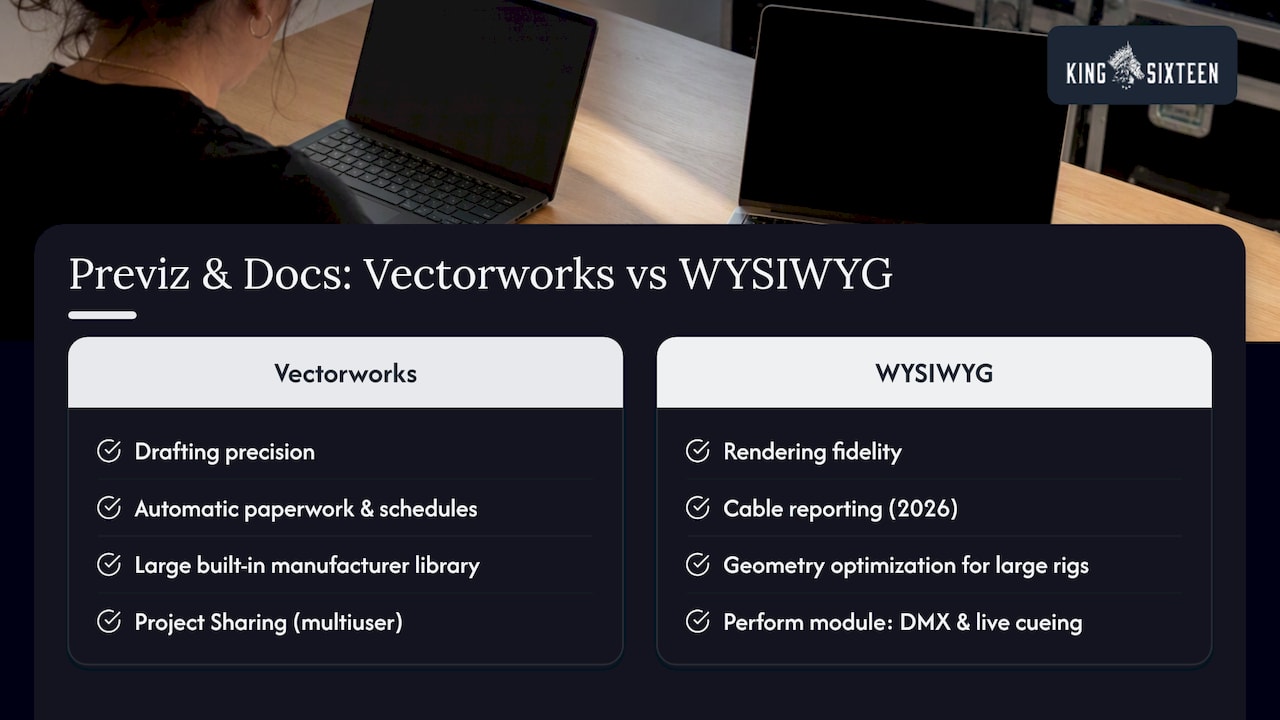
Vectorworks earns its reputation through drafting precision. It generates automatic paperwork, cable schedules, and instrument schedules straight out of the plot, runs natively on Mac and Windows, and carries a large built-in manufacturer library. Project Sharing lets multiple designers work the same file at once, which matters on anything with a tight turnaround and more than one draftsperson. Spotlight’s integration with GDTF and MVR means the file you draft is also the file you hand off, not a translation of it.
WYSIWYG earns its reputation through rendering fidelity. The WYSIWYG 2026 release added cable reporting, geometry optimization, and performance improvements aimed directly at large rigs, and the release notes detail face culling and nested-library handling changes meant to keep heavy shows from choking the viewport. Its Perform module adds DMX connectivity so programmers can cue and simulate a show in something close to real time, with cable and performance reports built for the previz side of the paper trail rather than the drafting side.
Large rigs with moving fixtures and particle or smoke effects are where the split shows up most. Vectorworks will draft the rig and generate the hang plot accurately, but it is not built to simulate smoke density or beam interaction in real time. WYSIWYG’s 2026 updates target exactly that kind of simulation load, including support for hybrid fixtures, which makes it the tool programmers actually sit in front of once the rig is hung on paper.
How license models, editions, and hardware choices change total cost
Vectorworks is sold in subscription tiers, with Spotlight as the lighting-specific edition; WYSIWYG ships in modular editions, from a Report/Design tier up through Perform, which adds DMX connectivity. Neither vendor publishes a single number that fits every production, so the better question is what the edition actually includes before you commit a team to it.
The hidden costs tend to matter more than the license itself. Training time adds up fast when a team splits between CAD drafting and real-time previz. WYSIWYG’s Windows-only requirement can force a hardware refresh for Mac-based shops, and heavier rigs demand GPU headroom that an older workstation won’t have. Console licenses and previz dongles stack on top of both.
When licensing or OS alone decides the call, it usually means the team already knows which workflow it lives in day to day, documentation-heavy or cue-heavy, and the software choice is just catching up to that reality.
Training investments and which roles should own each tool
Vectorworks carries a steeper learning curve for anyone new to CAD or BIM conventions, since paperwork, layering, and class structure all take time to internalize. WYSIWYG asks for a different fluency: comfort with DMX parameters, patch logic, and real-time cueing, which lighting operators often already have from console work.
A practical ramp plan assigns Spotlight to designers who own documentation and drafting, and hands WYSIWYG or Vision to programmers and look-development staff who live in cue stacks. Investing in structured training pays off here the way it does across most agency functions. Research on AI adoption in agencies points to real productivity gains when staff get dedicated ramp time on new tools rather than learning on a live job. When a team doesn’t have the bandwidth to build that fluency in-house, outsourcing the previz or documentation stage to a turnkey production partner is often faster than hiring and training from scratch.
Customization and scripting capabilities for advanced users
Vectorworks supports scripting through Vectorscript and Python, letting advanced users automate repetitive drafting tasks, batch-process symbol libraries, or build custom reporting tools that go beyond the default paperwork output. Studios running the same show format repeatedly often build their own scripts to generate instrument schedules or auto-tag fixtures by position, cutting hours off the documentation pass.
WYSIWYG’s customization leans toward the simulation side rather than scripting. Users can build custom fixture profiles, adjust rendering parameters for specific venues, and tune particle or smoke behavior for a given rig, but the depth of programmatic control sits closer to show-specific tuning than general-purpose automation.
The practical takeaway: teams with a programmer on staff or on retainer get more long-term value out of Vectorworks’ scripting layer, since it compounds across every future project that reuses the same automated workflows. Teams without that resource still get full previz value out of WYSIWYG without ever touching a script, since its customization options are built for in-app adjustment rather than code.
Integration with external hardware and control consoles
Both tools are built to talk to the hardware a lighting department already owns, but they do it at different points in the pipeline. Vectorworks hands off patch and fixture data through GDTF and MVR, so once a plot is finalized it can move into a console’s show file without re-patching by hand.
WYSIWYG’s Perform module includes DMX connectivity directly, which lets programmers drive real consoles and media servers from inside the previz environment, testing cues against the visualized rig before the physical rig exists. That real-time link is the main reason programmers sit in WYSIWYG rather than Vectorworks once a show moves from paper to cueing. For teams running hybrid fixtures or heavier automation, the 2026 WYSIWYG updates improve how the software handles that live DMX traffic without dropping frames on larger rigs, according to the release notes.
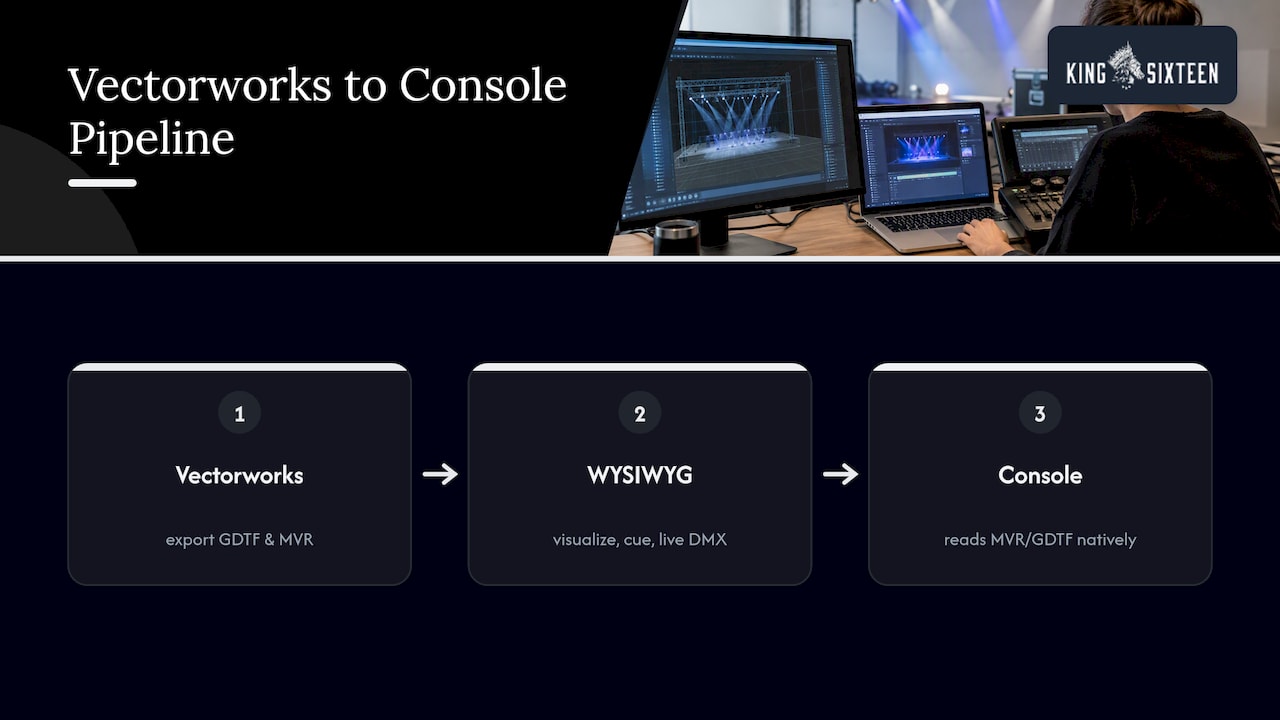
Console compatibility generally comes down to whether a console reads MVR and GDTF natively. Most major consoles and visualization platforms support that exchange as of 2026, which is what makes the Vectorworks to WYSIWYG to console chain work as a single pipeline rather than three separate translation steps.
Support and community resources
Vectorworks maintains active forum support where practitioners troubleshoot import issues, share workflow fixes, and post practical advice on file cleanup, the kind of detail that rarely makes it into official documentation. The company’s own help guides walk through previsualization step by step, down to specific commands like Update GDTF Files.
WYSIWYG’s documentation runs through CAST’s product pages and release notes, which detail module structure and version-specific changes in enough depth to plan a software update around. Community troubleshooting for WYSIWYG tends to live inside lighting-programmer circles and show-specific forums rather than one central board, since much of the day-to-day problem-solving happens on load-in rather than online.
Neither platform publishes a formal certification track the way some enterprise software does, so most skill-building happens through a mix of vendor documentation, peer mentorship on site, and trial and error on real shows. That makes the forums and release notes more valuable than they might be for a more rigidly structured piece of software.
Update and upgrade policies and frequency
Vectorworks ships annual releases tied to its subscription model, with incremental service packs addressing bugs and smaller feature additions between major versions. The GDTF and MVR support documented on its newsroom page has expanded with each release as more manufacturers and console platforms adopt the standards.
WYSIWYG’s 2026 updates landed as a named annual release with a detailed changelog covering geometry optimization, cable reporting, and performance improvements for large rigs. The accompanying release notes PDF lists specific technical changes, including increases to subsource counts and support for hybrid fixture simulation, giving production teams enough detail to decide whether an upgrade is worth scheduling around a live show calendar.
Both vendors treat GDTF and MVR compatibility as an ongoing target rather than a finished feature, since the standards themselves keep evolving as more manufacturers and console brands sign on. That means a pipeline that works cleanly this season is worth re-testing after each major update rather than assumed to keep working indefinitely.
Case studies and industry-specific use cases
Touring productions with heavy automation tend to lean on the full Vectorworks-to-WYSIWYG pipeline: drafting and paperwork in Spotlight, then a full previsualization pass in WYSIWYG to rehearse cues before the rig ever gets trucked. Corporate and experiential events, where the rig is smaller but the turnaround is tighter, often get more value out of Vectorworks alone, since the paperwork and venue coordination matter more than real-time cue rehearsal.
Broadway and regional theater productions frequently use Vectorworks for the official plot that goes to the venue and the electrician, while previsualizing trickier cue sequences in WYSIWYG before tech week starts, a pattern practitioners describe repeatedly on the Vectorworks forums. Concert touring, by contrast, often pushes further into WYSIWYG’s simulation side, since moving-light-heavy rigs benefit more from rehearsing cues against a rendered rig than from additional paperwork precision.
The pattern across all of these: documentation-heavy, venue-coordinated events skew toward Vectorworks, while cue-heavy, automation-dense shows skew toward spending more time in WYSIWYG. Teams running both event types in the same year usually keep both tools active rather than picking one permanently.
King Sixteen’s take on choosing the right toolchain for brand events
For brand activations and live productions, we lean on Vectorworks-led design when documentation and venue coordination carry the most risk, and bring in WYSIWYG-first previz when a show has enough automation or lighting complexity to justify rehearsing cues before load-in. Coordinating fixture libraries and documentation across both tools, rather than forcing one to do the other’s job, is usually what keeps a hybrid pipeline from breaking down mid-build.
— Tyler
How we bridge design and production for your next activation

We run production for brand activations, launches, and live events, coordinating lighting design, previsualization, and build documentation smoothly within one team to maintain consistency in fixture data, cable reports, and rig plots from start to load-in. If your next event needs a partner to support your production from concept through execution, explore experiential production services to find the right plan for your show.
FAQ
How much will Vectorworks cost in 2026?
Vectorworks sells its software through subscription tiers, with Spotlight as the lighting-specific edition, but the vendor does not publish a single universal price for every configuration. Check current pricing directly through Vectorworks’ own sales channels for an accurate quote tied to your edition and seat count.
Do interior designers use Vectorworks?
Yes, interior designers commonly use Vectorworks for its CAD and BIM capabilities, since the same drafting and documentation tools that serve lighting designers also support floor plans, furniture layouts, and construction documentation. The lighting-specific Spotlight module is one of several industry-focused editions built on the same core platform.
What are some good alternatives to Vectorworks?
Lighting and stage professionals sometimes evaluate other CAD or BIM platforms alongside Vectorworks, depending on whether their priority is drafting, documentation, or previz-specific features. The right alternative depends heavily on whether your team’s primary need is production paperwork or real-time show simulation.
Is Vectorworks better than AutoCAD?
Vectorworks and AutoCAD serve overlapping but distinct needs: Vectorworks includes industry-specific modules like Spotlight for lighting and stage design, along with native GDTF and MVR support, while AutoCAD is a more general-purpose drafting platform. For entertainment-industry documentation and previz handoff specifically, Vectorworks’ built-in GDTF and MVR support gives it a workflow advantage that AutoCAD was not built around.
Sources
- WYSIWYG 2026 updates & enhancements — CAST
- Key features: GDTF & MVR — Vectorworks
- Previsualization with Spotlight — Vectorworks Help (2026)