Geotargeting and geofencing are distinct location strategies with different jobs. Use geotargeting when you need scalable, market-level reach across a city, DMA, or ZIP code delivered through ad platforms using IP and profile signals. Use geofencing when you need a real-time, proximity-based trigger that fires the moment a device crosses a virtual boundary, typically powered by GPS, Wi-Fi, or cellular data.
- Scale vs. proximity: Geotargeting casts a wide net across defined geographic segments; geofencing draws a tight polygon around a specific place and reacts to physical presence in real time.
- Quick recommendation: For brand awareness and audience reach across a market, geotargeting is the lower-friction choice. For foot-traffic conversion, event capture, or competitor conquesting at a specific location, geofencing delivers the moment-based intent signal you need.
Both tactics are complementary, not competing. The FTC and platform-level policies from Apple and Google add consent requirements that shape how you deploy each, particularly for geofencing where precise GPS data is involved.
Key Takeaways
Geofencing and geotargeting are most effective when deployed together: geotargeting sets market-level reach, and geofencing converts physical presence into a qualified, retargetable audience.
| Point | Details |
|---|---|
| Choose by objective | Use geotargeting for market-level awareness; use geofencing for proximity-based conversion and event capture. |
| Geofencing needs consent infrastructure | GPS-based geofencing requires explicit opt-in under FTC guidance and Apple/Google platform policies before launch. |
| Match rates vary widely | Event geofence match rates range from roughly 5% to 70%, depending on provider and event characteristics; build this variability into your audience size and budget projections. |
| Measure with a control group | Foot-traffic lift requires a geo holdout or matched-panel design to separate campaign impact from organic trends. |
| King Sixteen delivers both | King Sixteen’s Geo Frame Marketing service integrates polygon design, creative sequencing, and measurement reporting into full experiential campaigns. |
Table of Contents
- What geofencing actually is and how it works
- What geotargeting is and how ad platforms deploy it
- How geotargeting and geofencing compare across key decision dimensions
- Practical use cases for both tactics
- What you need to launch each campaign type
- How to measure location-based campaign performance
- Advantages, limitations, and U.S. privacy considerations
- What campaigns typically cost and how long they take to launch
- How King Sixteen combines geofencing and geotargeting in live activations
- A practitioner’s take on when to use each
- King Sixteen’s location-based marketing services
- Sources
What geofencing actually is and how it works
Geofencing creates a virtual boundary around a real-world location, then triggers a defined action when a device enters or exits that boundary. That action could be a push notification, an in-app message, a retargeting pixel fire, or an audience segment update.
The technology stack behind a geofence varies by use case:
- GPS and A-GPS: Most precise option, accurate to roughly 10–30 meters outdoors. Battery-intensive and dependent on clear sky conditions.
- Wi-Fi positioning: Works well indoors where GPS degrades. Accuracy ranges from a few meters to about 50 meters depending on access-point density.
- Cell-tower triangulation: Lower precision (hundreds of meters to a few kilometers), but works in areas with poor GPS or Wi-Fi coverage.
- Bluetooth beacons (BLE): Sub-10-meter accuracy inside venues. Requires beacon hardware installed on-site and a compatible app on the user’s device.
- IP-based geofencing: No app required, but precision drops to city or ZIP-code level. Useful for web-based delivery when physical proximity isn’t the primary signal.
The operational reality is that geofencing often requires an app or device-level trigger. For push notifications and in-app actions, users must have the brand’s app installed and have granted location permissions. iOS and Android handle background location access differently: iOS restricts background location to apps that explicitly request “Always On” permission, which users grant at lower rates than “While Using.” Android is more permissive but has tightened with each OS version. For web-based or CTV delivery, IP and Wi-Fi methods can substitute, though at the cost of precision.
Match rates reflect this complexity. A well-configured GPS-based geofence at a high-traffic venue can vary widely in match percentage of devices present, depending on provider and event density. Planning for variability in match rate is part of any honest geofencing brief.
What geotargeting is and how ad platforms deploy it
Geotargeting delivers ads based on geographic parameters such as country, DMA, city, or ZIP code, using IP address data, ad-platform location settings, and declared profile signals. No app is required. No real-time boundary crossing is involved. The system simply checks where a user appears to be located and serves them an eligible ad.
Practically, geotargeting runs across every major paid channel:
- Search: Bid adjustments by city, DMA, or radius from a point.
- Social: Audience targeting by location at the country, state, city, or ZIP level, layered with demographic and interest signals.
- Programmatic display and video: DSP-level geographic filters applied at the impression level.
- Connected TV (CTV): Household-level targeting by DMA or ZIP, often combined with behavioral or purchase-intent data.
The real power of geotargeting is layering. You can target a DMA and then narrow to users who also match a specific income bracket, job title, or behavioral category. That combination is what audience targeting strategies are built on, and it’s where geotargeting outperforms geofencing for awareness-stage campaigns.
Geotargeting’s constraint is precision. A ZIP code covers thousands of households. A DMA covers millions. You’re reaching people who live or work in an area, not people who are physically present at a specific location right now. That distinction matters for conversion-focused campaigns where physical proximity is the intent signal.
How geotargeting and geofencing compare across key decision dimensions
The table below maps both tactics across the dimensions that drive campaign planning decisions.
| Dimension | Geofencing | Geotargeting |
|---|---|---|
| Precision | Meters to a few hundred meters (GPS/Wi-Fi/beacon) | ZIP code to DMA (IP/platform signals) |
| Data source | GPS, A-GPS, Wi-Fi, BLE beacons, cell towers | IP address, ad-platform location settings, profile data |
| Trigger type | Real-time entry/exit event | Eligibility check at ad serving time |
| Required assets | App + SDK or IP/Wi-Fi delivery for web/CTV | Ad platform account with location settings |
| Reach / scale | Limited to devices physically present in the polygon | Scales to full market, city, or national audience |
| Best for | Foot traffic, event capture, competitor conquesting | Brand awareness, market-level reach, layered audience targeting |
| Privacy & compliance | GPS requires explicit opt-in; FTC and Apple/Google policies apply | IP-based; lower consent friction but still subject to platform policies |
| Cost / complexity | Higher CPM, SDK/app setup, polygon design required | Lower CPM, faster setup, no app dependency |
Three quick rules of thumb for choosing:
- If your goal is to reach everyone in a metro who fits a demographic profile, geotargeting is faster and cheaper.
- If your goal is to reach people who are physically at a specific venue, competitor location, or event right now, geofencing is the right tool.
- If your goal is to build a qualified audience from real-world attendance and then convert them over the following weeks, you need both.
Pro Tip: Use geotargeting to select your market and build awareness before an event, then layer a geofence around the venue to capture high-intent attendees. The combination creates a full-funnel location strategy from a single campaign budget.
Practical use cases for both tactics
Geofencing is best for proximity and moment-based intent, while geotargeting handles scalable market-level reach. Here’s how that plays out across common marketing scenarios:
Retail foot-traffic conversion Draw a geofence around your store and a competitor’s location. Serve a discount offer to anyone who enters the competitor’s polygon. KPIs: foot-traffic lift (visits per exposed user), in-store conversion rate. Expect a 7–14 day attribution window for this type of campaign.
Trade show and conference capture Event geofencing captures attendees during the event and enables retargeting for up to 30 days post-event. Match rates vary widely, from roughly 5% to 70%, depending on the provider and event density. KPIs: audience match rate, post-event CTR, pipeline influenced. Pair with geotargeted CTV in the same DMA to reach attendees who weren’t captured by the fence.

Competitor conquesting Geofence a competitor’s flagship location or their trade show booth. Serve a direct comparison ad or a trial offer. This is one of the highest-ROI geofencing use cases because the audience self-selects by physical presence.
Local promotions and grand openings Geotargeting by ZIP code or a radius around a new location drives awareness efficiently before opening day. Switch to geofencing once the location is live to capture walk-by traffic and convert it.
CTV brand awareness in priority markets Geotargeting by DMA on CTV reaches households in your target market without requiring any app. Useful for brand campaigns tied to regional launches or seasonal pushes. KPI: reach, frequency, brand lift survey results.
B2B event intent capture for ABM Geofencing captures real-world intent signals that traditional event tracking misses. At an industry conference, a geofence around the venue builds a verified-attendance audience you can match against your CRM or target account list for account-based marketing follow-up. KPI: matched accounts, pipeline acceleration.
What you need to launch each campaign type
Getting either tactic live requires more than flipping a switch in an ad platform. Here’s what the pre-launch checklist looks like in practice.
Geotargeting launch checklist
- Define geographic segments (DMA, city, ZIP, radius) aligned to your distribution footprint or event market.
- Set up location targeting in your ad platform of choice (search, social, programmatic DSP, or CTV).
- Layer audience signals: demographics, job title, behavioral categories, or CRM match lists.
- Prepare creative sized and formatted for each channel.
- Configure UTM parameters and conversion tracking before launch.
- Confirm platform-level consent settings are current.
Geofencing launch checklist
- Define polygon boundaries: size matters. A polygon smaller than 1,000 square feet produces false negatives because GPS drift moves devices in and out. A polygon larger than a city block loses proximity precision.
- Choose your delivery method: app + SDK for push/in-app, or IP/Wi-Fi-based for web and CTV.
- If using an app, confirm SDK integration and test location permission prompts on both iOS and Android.
- Set up exclusion zones (e.g., exclude your own store from a competitor-conquesting fence).
- Configure retargeting windows: most platforms support 7–30 days post-exposure.
- Integrate with your CRM or CDP for audience matching and cross-device extension.
- Set up server-side tracking or a conversion API to capture post-exposure actions without relying solely on pixel-based attribution.
Common operational pitfalls
Overfencing is the most frequent mistake. A geofence that covers an entire shopping district captures too much ambient foot traffic and dilutes the intent signal. Conversely, a fence drawn too tightly around a single storefront misses devices that GPS places 20 meters away. OS-level background location restrictions on iOS mean push-based geofencing requires users to have granted “Always On” permission, which is a meaningful friction point in consumer apps.
How to measure location-based campaign performance
Measurement is where many location campaigns fall short. Foot traffic lift is the headline metric, but it needs a baseline and a control group to mean anything.
- Foot-traffic lift: Visits per exposed user compared to a matched control group that was not served the campaign. Use a geo holdout (a comparable market with no campaign running) or a matched-panel design to isolate the campaign’s contribution from natural traffic trends.
- Store conversion rate: Of the devices that entered the geofence, what percentage completed a purchase or a defined in-store action? Requires point-of-sale integration or loyalty program matching.
- Post-exposure online conversions: Track site visits, form fills, and purchases from users who were exposed to a geotargeted or geofenced ad within a defined attribution window (same-day, 7 days, or 30 days depending on your purchase cycle).
- CTR and CPM: Standard digital metrics, but interpret them in context. A geofenced audience is smaller and higher-intent, so a lower CTR than a broad geotargeted campaign doesn’t indicate underperformance.
- Incremental app installs: For campaigns that include an app download CTA, track installs from exposed users versus the control group.
- Matched account pipeline (B2B): For ABM event campaigns, measure the number of target accounts whose employees were captured by the geofence, and track pipeline movement in those accounts over the following 60 to 90 days, to assess influence.
For measuring experiential ROI accurately, always report lift with a stated baseline and confidence interval. A campaign that drove a 15% foot-traffic lift in a market that was already trending up 12% organically is a much weaker result than the headline number suggests.
Advantages, limitations, and U.S. privacy considerations
Geofencing: strengths and constraints
Strengths: Real-time proximity triggers, high-intent audience capture, venue-level precision, post-event retargeting capability, and measurable real-world behavior signals.
Constraints: Requires app installation and explicit location permissions for GPS-based delivery. Match rates vary widely. Higher CPM than broad geotargeting. Polygon design requires skill to avoid false positives and negatives. iOS background location restrictions reduce reliability for push-based campaigns.
Geotargeting: strengths and constraints
Strengths: No app required, scales to full markets, lower CPM, fast setup, and easy layering with demographic and behavioral signals across every major ad platform.
Constraints: ZIP-code or DMA precision only. No real-time physical presence signal. Less effective for conversion campaigns where proximity is the intent driver.
U.S. privacy and consent requirements
The FTC’s guidance on location data makes clear that collecting precise GPS coordinates is sensitive data requiring affirmative consent. Apple’s App Tracking Transparency framework and Google’s location permission model both require explicit user opt-in for precise location access. For geofencing campaigns, this means:
- Apps must present a clear, plain-language permission prompt explaining why location data is collected and how it will be used.
- “Always On” location access requires a separate, justified request beyond the standard “While Using” prompt.
- Data retention should be limited: most platforms recommend retaining raw location data for no longer than 30–90 days unless there is a specific business need.
- Web-based geofencing using IP data is lower-friction from a consent standpoint but must still comply with applicable state privacy laws, including the California Consumer Privacy Act (CCPA) and similar statutes in Virginia, Colorado, and Texas.
Consent best practice: Build your opt-in flow before you build your polygon. A geofence that captures devices without a compliant consent mechanism is a liability, not an asset.
Geotargeting via IP and ad-platform signals carries lower consent friction because it doesn’t access device-level GPS. However, ad platform policies still require accurate audience disclosures and prohibit using location data to infer sensitive categories such as health conditions or religious affiliation.
What campaigns typically cost and how long they take to launch
Cost and timeline vary significantly by delivery method, audience scale, and campaign complexity.
Cost drivers:
- Polygon complexity: more polygons, more design and QA time.
- Match rate and audience scale: a small event geofence may capture only a few thousand devices; a DMA-level geotargeted campaign can reach millions.
- Data licensing: some geofencing platforms charge for audience data on top of media costs.
- Creative production: geofencing campaigns often require multiple creative versions for pre-event, on-site, and post-event phases.
- Agency setup and management fees: managed geofencing services typically carry a setup fee plus a percentage of media spend.
Typical timelines:
- Geotargeting campaign (search, social, programmatic): 2–7 days from brief to live, assuming creative is ready.
- Geofencing via IP/Wi-Fi for web or CTV: 1–2 weeks, including polygon design and platform setup.
- Geofencing with app/SDK integration: 4–8 weeks, accounting for SDK implementation, QA, and app store review cycles.
- Event geofencing with post-event retargeting: Plan for 2–4 weeks of pre-event setup plus a 7–30 day retargeting window after the event closes.
Budget shapes: Platform-level geotargeting typically costs less per reach than hyper-local geofencing. A local geotargeting pilot on search or social can run on a few hundred dollars per week. A managed event geofencing campaign at a mid-size trade show typically starts in the low four figures for media plus setup, scaling up with audience size and creative complexity. Multi-market geofencing rollouts with CRM matching and post-event retargeting can reach five figures or more.
How King Sixteen combines geofencing and geotargeting in live activations
At King Sixteen, location strategy isn’t a media add-on. It’s built into the activation architecture from day one. Here’s how we approach a typical trade show or product launch scenario.
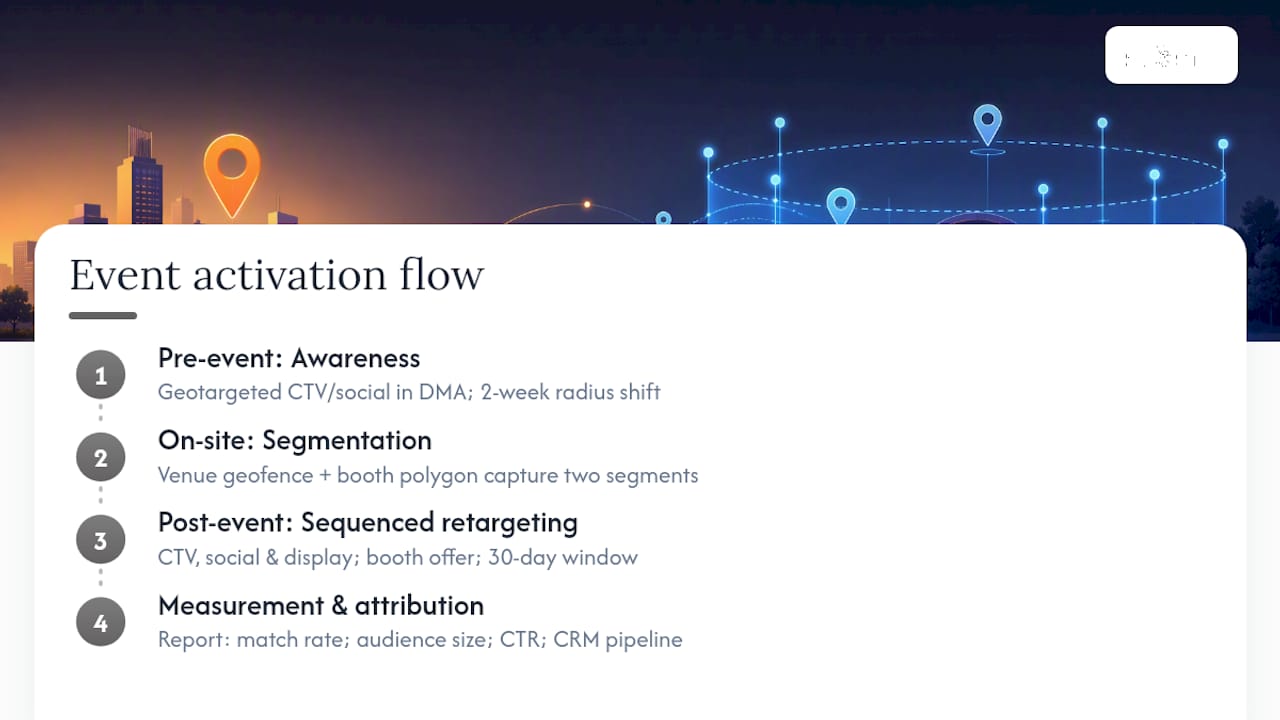
Before the event, we run geotargeted CTV and social ads in the host city’s DMA to build awareness among the target audience. The creative at this stage is brand-level: who’s there, what’s happening, why it matters. Two weeks out, we tighten the targeting to a radius around the venue and shift the message to attendance-driving content.
On-site, we deploy a geofence at the venue perimeter and, where the event layout allows, a tighter polygon around the brand’s specific booth or activation space. This captures two distinct audience segments: general attendees and high-intent visitors who physically engaged with the brand’s space. The distinction matters for post-event creative sequencing.
Post-event, the captured audiences receive sequenced retargeting across CTV, social, and display. General attendees see a brand recall message. Booth visitors see a direct conversion offer. The retargeting window runs up to 30 days, which aligns with typical B2B consideration cycles for the categories we work in.
Geofencing at a live event doesn’t just tell you who was there. It tells you who cared enough to stop. That’s the audience worth investing in post-event, and it’s the signal that most event measurement frameworks completely miss.
The measurement output includes a post-campaign report covering match rate, audience size by segment, post-event CTR, and, where CRM matching is possible, pipeline influence. We design the polygon and the attribution model together, because a geofence without a measurement plan is just a boundary on a map.
Pro Tip: Sequence your creative to the visitor journey: awareness pre-event, urgency on-site, and a specific offer post-event. Serving the same ad to someone who already visited your booth is a missed conversion opportunity.
For event marketing strategies that integrate location data with onsite activation, the combination of geofencing and geotargeting consistently outperforms either tactic alone.
A practitioner’s take on when to use each
The choice between geotargeting and geofencing usually comes down to one question: are you trying to reach people in a place, or people who are at a place right now?
For enterprise brands running multi-market campaigns, geotargeting is the foundation. It scales, it layers cleanly with first-party data, and it runs across every channel without app dependencies. Geofencing is the precision instrument you add when a specific location, event, or moment is the conversion trigger.
For local businesses or single-market activations, geofencing often delivers better ROI per dollar because the audience is inherently qualified by physical proximity. The setup complexity is higher, but the intent signal is stronger.
When combining both, the governance question matters as much as the tactics. Location strategy should be owned by a single team, typically marketing operations or a dedicated analytics function, with clear accountability for consent compliance, data retention, and attribution methodology. Splitting ownership between a media buyer, an event team, and a digital analyst without a shared measurement framework is how campaigns produce conflicting numbers and no clear learning.
King Sixteen’s location-based marketing services
King Sixteen brings geofencing, geoframing, and geotargeting directly into the experiential campaigns we build for high-value brands. Our Geo Frame Marketing service pairs polygon design and audience capture with the onsite activation, creative sequencing, and measurement reporting that turns location data into pipeline.

We work across three engagement models: a focused pilot for a single event or activation, a project-based engagement for a product launch or trade show season, and a retainer for brands running continuous location-based programs. Each includes polygon strategy, creative sequencing across pre-event, on-site, and post-event phases, and a post-campaign measurement report.
If you’re planning a conference, trade show activation, or product launch and want location data to drive measurable outcomes, talk to our experiential team about how we structure these campaigns from brief to results.
Sources
The following sources cover geofencing mechanics, geotargeting strategy, event capture, and measurement best practices relevant to U.S. marketers.
- What is geofencing? — Verizon Business
- What is geofencing and how to use it in your marketing — Shopify
- What Is Geotargeting and Why It’s an Important Advertising Strategy? — Mailchimp
- Event Geofencing – Qujam
- How to use geofencing to maximize conference and event attendance — Propensity
- Geotargeting vs. Geofencing: Location Strategy for Ads — AI Digital
Recommended
- Geo Frame Marketing | Target with Confidence – Drive Engagement — King Sixteen
- Top 6 geoframe.blogspot.com Alternatives 2026
- Blog 3 — King Sixteen