For most marketing and event teams, the right trade show lead capture approach comes down to one question: do you have the in-house capacity to own the process, or do you need a partner who handles everything from booth staffing to CRM handoff? In-house teams running standardized booths get strong results with entry-level field apps or enterprise lead-capture platforms. Complex activations, multi-brand portfolios, and high-stakes sponsor experiences are where a managed-service agency like King Sixteen earns its place.
Three steps to get a pilot running:
- Run a live capture pilot at your next smaller event using your shortlisted tool or agency, and stress-test offline mode before show day.
- Check integrations first — confirm the solution maps to your exact CRM fields in Salesforce, HubSpot, or Marketo before you commit.
- Train your reps on qualifiers at least one week out, not the morning of the show.
Key Takeaways
The strongest trade show lead capture programs combine the right capture method, a structured qualifier workflow, and a follow-up process that starts within 24–72 hours of the interaction.
| Point | Details |
|---|---|
| Match model to team capacity | Use self-serve apps for standardized booths; choose agency-managed capture for complex activations. |
| Offline mode is non-negotiable | Confirm offline-first capture with automatic sync before committing to any platform or vendor. |
| Qualifiers beat volume | A lead with context (timeline, pain point, budget signal) is worth more than ten badge scans with no notes. |
| Follow up within 24–72 hours | The conversion window closes fast; enforce the follow-up rule before the show, not after. |
| King Sixteen as managed option | King Sixteen delivers end-to-end capture, staffing, real-time dashboards, and post-show audit reports as a turnkey service. |
Table of Contents
- How does trade show lead capture actually work?
- What features should you evaluate in a lead capture solution?
- Best practices for capturing and following up on leads
- Software vs. agency: which lead capture model fits your team?
- Questions to ask vendors and agencies before you sign
- What does trade show lead capture software actually cost?
- How King Sixteen manages capture for high-profile brand activations
- Why trade show lead capture fails more often than it should
- King Sixteen runs lead capture as a fully managed service
- Sources
How does trade show lead capture actually work?
At its core, event lead capture converts a booth interaction into a structured, CRM-ready contact record. The capture method varies by event type and team setup, but the data workflow that follows is consistent across every good solution.
Primary capture methods:
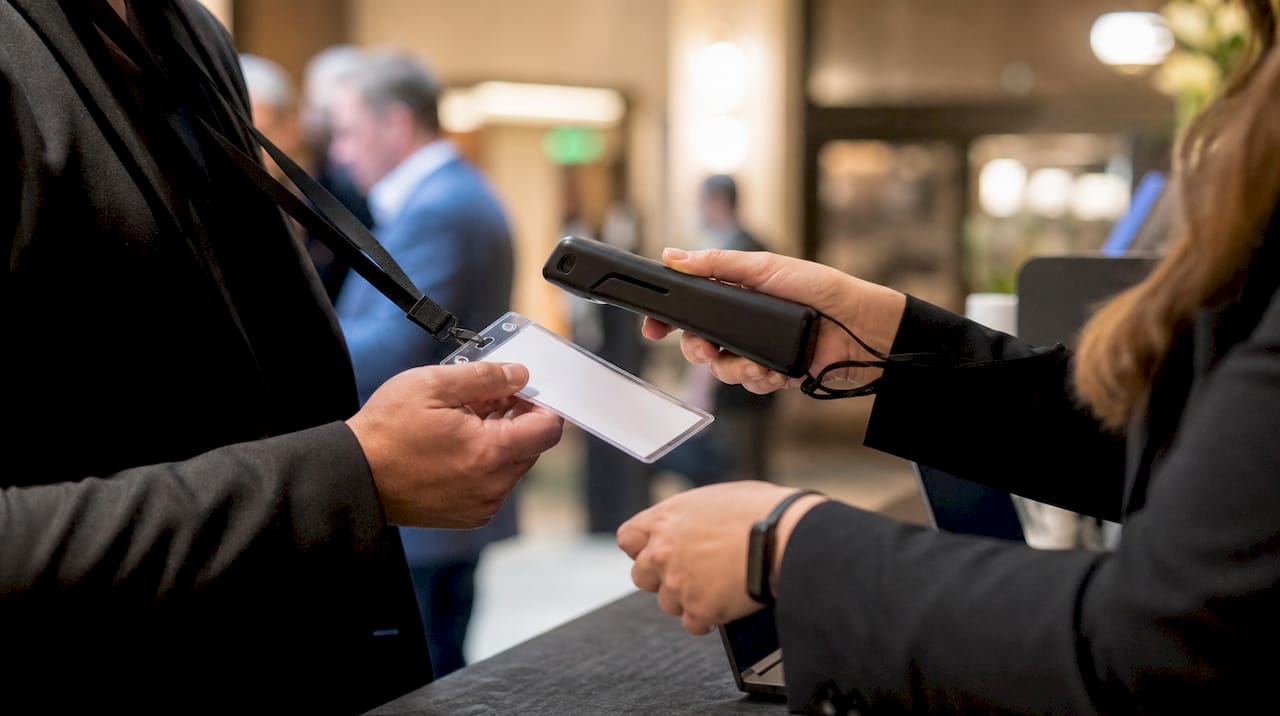
- Badge scan / QR code — the fastest method; reads attendee data encoded in the event badge
- Business-card OCR — optical character recognition parses a physical card into digital fields
- Manual entry — rep types contact details directly; slowest but useful as a fallback
- Self-service kiosks — attendees enter their own data, often paired with a giveaway or demo registration
- NFC tap — attendee taps a phone or wearable to transfer contact data instantly
Once captured, data moves through a short but critical pipeline: capture at the booth, qualification and context tagging by the rep, enrichment and validation (either in-app or via a connected tool), and finally CRM sync with reporting. PCMA’s structured meeting workflow guidance reinforces why this sequence needs to be predictable and pre-planned, not improvised on the floor.
Offline mode matters more than most teams expect. Show floors are notoriously unreliable for connectivity. Eventkrowd’s lead retrieval documentation notes that offline-first capture with automatic sync is a baseline requirement, not a premium feature. A solution that drops data when Wi-Fi cuts out is a liability, not a tool.
| Capture method | Speed | Accuracy | Offline capable |
|---|---|---|---|
| Badge scan / QR | Very fast | High (event data) | Yes, with good apps |
| Business-card OCR | Fast | Medium-high | Yes |
| Manual entry | Slow | Variable | Yes |
| Self-service kiosk | Medium | High (self-reported) | Depends on setup |
| NFC tap | Very fast | High | Limited |
What features should you evaluate in a lead capture solution?
The gap between a tool that collects names and one that feeds your pipeline is almost entirely in the feature set. Momencio’s platform overview describes badge scan, card OCR, kiosk capture, AI enrichment, and instant CRM sync as the core capability stack that lets sales teams act on leads while the show is still live.
Feature checklist:
- Badge scanning speed and format support (QR, barcode, NFC)
- Card OCR accuracy and field-mapping quality
- Custom qualifier forms and branching logic
- Lead scoring rules (rep-assigned or AI-driven)
- In-app notes and voice note attachment
- AI enrichment from external data sources
- Real-time CRM sync vs. batch export
- Offline capture with automatic sync
- Multi-user and team management features
- Exhibitor portal and post-show reporting dashboard
Those features map directly to the buyer concerns that determine whether a solution actually improves your follow-up rate. Event data strategy is only as strong as the capture layer feeding it.
| Dimension | Entry-level field apps | Enterprise platforms | Agency-managed capture |
|---|---|---|---|
| Badge scan & OCR | Basic | Advanced | Configured per event |
| CRM integrations | Limited (1–2) | Broad (Salesforce, HubSpot, Marketo) | Custom-mapped |
| Offline reliability | Variable | Strong | Managed onsite |
| Data validation | Minimal | Automated | Human + automated QA |
| Real-time sync | Sometimes | Yes | Yes, with dashboards |
| Analytics & ROI reporting | Basic | Advanced | Full post-show audit |
| Ease of training | High | Medium | Handled by agency |
| Pricing model | Subscription / per-seat | Subscription + add-ons | Project / retainer |
| Scalability | Small teams | Enterprise | Multi-event portfolios |
Best practices for capturing and following up on leads
Capturing a badge scan is easy. Capturing a lead that actually converts is a different discipline. Integrate’s five best practices frame the core logic well: keep capture simple, prioritize accuracy, capture context, personalize follow-up, and connect everything to your CRM.
- Keep the capture form short. Three to five qualifier fields max. Reps who are filling out a ten-field form lose the conversation.
- Capture context at the moment of interaction. A qualifier like “timeline to purchase” or “primary pain point” is worth more than a job title. Use branching logic to surface the right question for each visitor type.
- Validate and enrich data at capture. AI enrichment tools can append company size, industry, and LinkedIn data in real time, so your CRM record is complete before the rep moves to the next visitor.
- Follow up within 24–72 hours. Bizzabo’s event lead capture research points to fragmented data and delayed follow-up as the primary reasons organizers struggle to prove event ROI. The window closes fast.
- Connect event data to CRM for attribution. Treat the lead record as the start of a revenue workflow, not a post-event CSV. Attendee engagement tactics that generate data are only valuable when that data flows into a system your sales team actually uses.
Pre-show, on-floor, and post-show task checklist:
- Pre-show: Configure qualifier forms, test offline mode, assign rep roles, confirm CRM field mapping, and run a 30-minute team walkthrough.
- On-floor: Scan every interaction (no paper backup lists), attach a voice note for high-priority leads, and sync data at every break.
- Post-show: Export and review within 24 hours, segment by qualifier score, and trigger personalized follow-up sequences by lead tier.
Pro Tip: Record a 10-second voice note on each high-priority lead record immediately after the conversation. When your sales rep listens before their follow-up call, they get the context that no form field captures, and the personalization shows.
BoothMaven’s capture workflow documentation describes this combined approach, where voice notes, scoring, and automated follow-up work together to deliver a CRM-ready record before the next visitor arrives.
Software vs. agency: which lead capture model fits your team?
The honest answer is that both models work. The question is which one fits your team’s capacity and your event’s complexity.
Choose a self-serve lead capture app when:
- Your team runs standardized booths with consistent rep coverage
- You have an in-house marketing ops person who can own CRM mapping and follow-up sequences
- Your event portfolio is small (one to three shows per year)
- Speed-to-setup and cost control are the primary drivers
Choose an agency-managed service when:
- The activation is complex: multi-zone booths, experiential environments, or sponsor-facing data deliverables
- Your team doesn’t have bandwidth to own pre-event configuration, onsite QA, and post-show reporting simultaneously
- You need a turnkey staffing and data handoff solution, not just a software license
- The brand on the floor is high-profile enough that a data error or missed follow-up has real consequences
Showcare’s lead retrieval documentation illustrates what a managed service looks like in practice: onsite support, device distribution, exhibitor training, and post-show audit reports are all bundled, not optional add-ons.
Pro Tip: If your team has never run a structured capture workflow before, start with a managed service for one event. The playbook you inherit from that experience is worth more than the cost savings of going it alone.
The software vs. agency decision also shifts based on how you measure success. If your KPI is pipeline generated per event, you need reporting infrastructure that most entry-level apps don’t provide out of the box.
Questions to ask vendors and agencies before you sign
A demo looks good in a conference room. The real test is what happens when the Wi-Fi drops at 9 AM on day one of a 10,000-attendee show.
- Which CRM fields does your integration map to, and can we customize the field mapping before the event?
- What is your SLA for data delivery post-show, and what format does the export arrive in?
- How does your offline mode work, and what triggers the sync when connectivity returns?
- How is attendee data stored, who has access, and what is your data retention and deletion policy?
- What does onboarding look like, and how long does it take to configure for a new event?
- Do exhibitors get a self-service portal, and what reporting is available in real time vs. post-show?
- Can we run a live capture test before the event, and do you provide a sandbox environment?
Red flags to watch for:
- No offline mode, or offline mode that requires manual re-entry after reconnection
- Post-show data delivery is a manual CSV with no enrichment or scoring
- Pricing is opaque, with add-on fees for integrations, extra users, or reporting
- No demo environment or sandbox available before purchase
- Documentation is thin and support is email-only with no onsite option
Practical evaluation step: Ask for a sample post-show audit report before you sign. A vendor confident in their reporting will share one. One that hedges is telling you something. Showcare’s audit report model is a useful benchmark for what a complete deliverable looks like.
What does trade show lead capture software actually cost?
Pricing varies significantly by model, and headline fees rarely tell the full story.
Software pricing models:
- Subscription tiers: Monthly or annual plans, typically priced per user or per event, ranging from entry-level to enterprise
- Per-seat fees: Each rep using the app at the show is billed separately, which adds up fast for large booth teams
- Per-scan fees: Some platforms charge per lead captured, which creates unpredictable costs at high-traffic shows
- Add-on fees: AI enrichment, advanced analytics, and CRM integrations are often priced separately from the base plan
Agency pricing shapes:
- Project fee: Fixed price for a defined scope, covering planning, staffing, hardware, and reporting
- Per-event retainer: Recurring fee for multi-event portfolios, often with volume discounts
- Day rates: Staffing and production billed by the day, with tech and logistics as separate line items
ROI modeling basics:
| Cost driver | Software model | Agency model |
|---|---|---|
| Upfront cost | Low to medium | Medium to high |
| Per-event variable cost | Per-seat or per-scan | Included in project fee |
| Internal labor required | High (config, training, QA) | Low (agency owns it) |
| Reporting quality | Varies by tier | Included, post-show audit |
| Break-even signal | Works when team capacity exists | Works when activation complexity is high |
To model ROI, estimate the pipeline value of your average qualified lead, multiply by your historical show-to-pipeline conversion rate, and compare that to the total cost of your capture solution. Why events drive revenue is a useful framework for building that calculation with your own numbers.
How King Sixteen manages capture for high-profile brand activations
King Sixteen’s approach to event lead capture is built into the activation itself, not bolted on afterward. For brands like Porsche, Audi, Ray-Ban, and Fossil, the capture workflow starts in the pre-event planning phase, where qualifiers are designed around the brand’s actual sales conversation, not a generic form template.
The King Sixteen capture service flow:
- Pre-event planning: Qualifier design, CRM field mapping, rep playbook development, and hardware configuration
- On-floor capture and staffing: Trained brand ambassadors and event staff executing structured capture at every interaction point
- Real-time dashboards: Live lead counts, qualifier breakdowns, and priority flags visible to the client during the show
- Post-show handoff: Prioritized follow-up sequences, enriched lead records, and a full audit report delivered within 24 hours
The result is a data handoff that a sales team can act on immediately, not a spreadsheet that sits in someone’s inbox for a week. That speed matters because the follow-up window is narrow.
King Sixteen’s turnkey model means the client’s marketing team isn’t managing a software vendor, training reps on a new app, and chasing a post-show export at the same time. The agency owns the workflow end to end, and the client receives a clean, scored, CRM-ready lead file alongside a sponsor-ready audit report.
For brands running experiential trade show activations at this level, the capture infrastructure is as important as the booth design. King Sixteen builds both.
Why trade show lead capture fails more often than it should
The failure mode is almost always the same: a team arrives at the show with a scanning app they configured the night before, no qualifier logic, and a follow-up plan that starts “after we get back to the office.” Three days later, the leads are cold and the context is gone.
What actually fixes it:
- Structured capture forms designed before the show, not improvised on the floor
- Rep playbooks that tell staff exactly what to ask and how to tag each lead type
- Onsite QA during the show, not a post-show audit of what went wrong
- Real-time dashboards so the team lead can see capture volume and quality as it happens
- A 24-hour follow-up rule that is enforced, not aspirational
The one action you can take in the next seven days: pull your last post-show lead export and count how many records have a qualifier field filled in. If most records lack qualifiers, your capture process needs a redesign before your next event.
King Sixteen runs lead capture as a fully managed service
Brands that need more than a scanning app get a different kind of result with King Sixteen. As a full-service experiential agency, King Sixteen handles the entire capture and follow-up workflow: pre-event planning, trained on-floor staff, real-time dashboards, enriched lead records, and a post-show audit report delivered within 24 hours of the event closing.
You don’t manage a vendor, train your reps on new software, or chase a CSV export. King Sixteen owns the process so your team can focus on the conversations that matter. The result is a CRM-ready lead file your sales team can act on immediately, paired with sponsor-quality reporting that proves the event’s value. If your next activation deserves that level of execution, reach out to King Sixteen to start the conversation.
Sources
- Integrate — 5 best practices for lead capture at events and conferences
- Bizzabo — The best way to capture leads at events with a lead capture app
- Eventkrowd — Event lead retrieval
- Momencio — Event lead capture app
- Showcare — Lead retrieval for events
- BoothMaven — Trade show & event lead capture app
Recommended
- The Best KRo Events Alternatives for Brand Activations
- Event Attendee Experience Guide for Planners
- Best Eighteentwentysix.com Alternatives for Event Teams